What I should learn
How to start a race using the Bunch start technique.
How to start a race using the Bunch start technique.
Watch a video clip on bunch start.
Observe the following:
You can also read sport magazines, journals, newspapers and look at photographs and posters on bunch start.
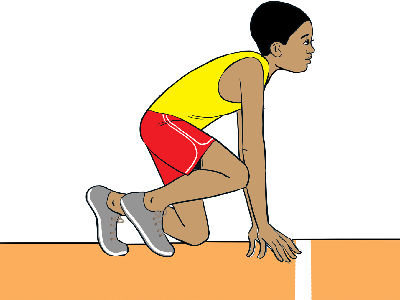
The bunch start is also known as the Bullet Start. In this start the knee of the rear leg is opposite the toe of the leading leg. The hands are placed shoulder-width apart behind the starting line.
Use the following learning points to perform the bunch start technique.
On the command, ‘on your marks’, go to the starting line on crouch position.
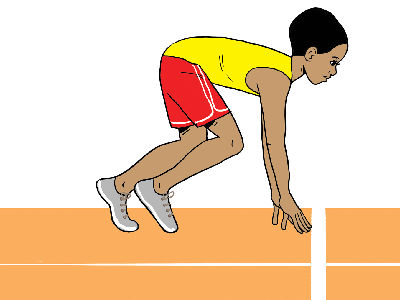
In a semi-circle formation, demonstrate the body alignment in the bunch Sprint start technique on the command ”on your mark” as observed in figure 1.2 and get feedback from the teacher.
Individually demonstrate the body alignment on the ‘set’ command as observed in figure 1.3.
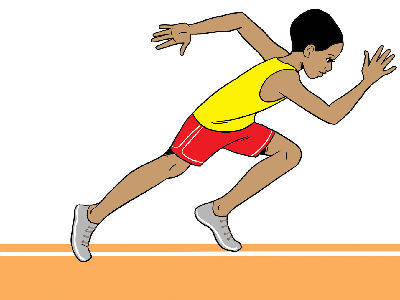
Individually demonstrate the forward push and acceleration on the command “go” as observed in figure 1.4.
In groups of five:
Teams | Place the feet properly during the start commands. | Place the hands behind the marked start line. | Need more practice |
Blue | |||
Green | |||
Yellow | |||
Red |
A member of a school relay team got sick a day before the team took part in an athletic competition. The team had prepared well. They felt demoralized because he was unable to recover before the competition. Luckily a reserve member of the team was asked to replace the athlete who got sick. On the day of the competition, the team woke up earlier than usual to practise with the new member. He learnt how to change over the baton and got ready for the competition.
During the competition the team practised good team spirit and they were able to win the race. They were very proud of each other.
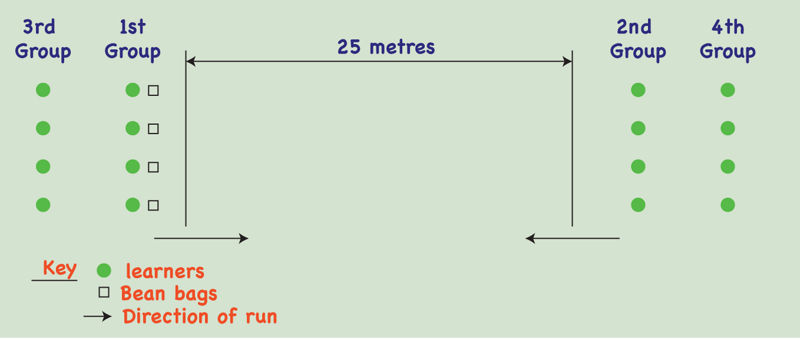
Teach the peers in the neighbourhood the bunch start. Once they have learned, use it to start and run short races.
Put a tick where appropriate | I can | I need more practice to |
| ||
| ||
|
Learner’s comments
What would you like to do with the text? The text is processed by artificial intelligence, it is not checked or edited! The text may contain errors. Check the accuracy of the text against the original text in the textbook.
Choose the files you want to add. Supported formats are txt, html, htm, pdf, odt, odp, ods, xls, xlsx, ppt, pptx, pps, doc, docx, rtf, png, jpg, jpeg and gif.
| Name | |
|---|---|
| remove |
NB! Links must begin with: “http://”!
Opiq uses essential cookies to make our website work, to help keep you safe, to analyse user interaction and to improve user experience.
Cookie is a small file which is sent from users computer to the website server. It includes necessary information for the website to operate and includes information about the user and their preferences.
Most of the cookies are necessary for the operation of Opiq. It is possible to deny analytical cookies and in that case your usage data is not used to develop and improve Opiq services. Read more